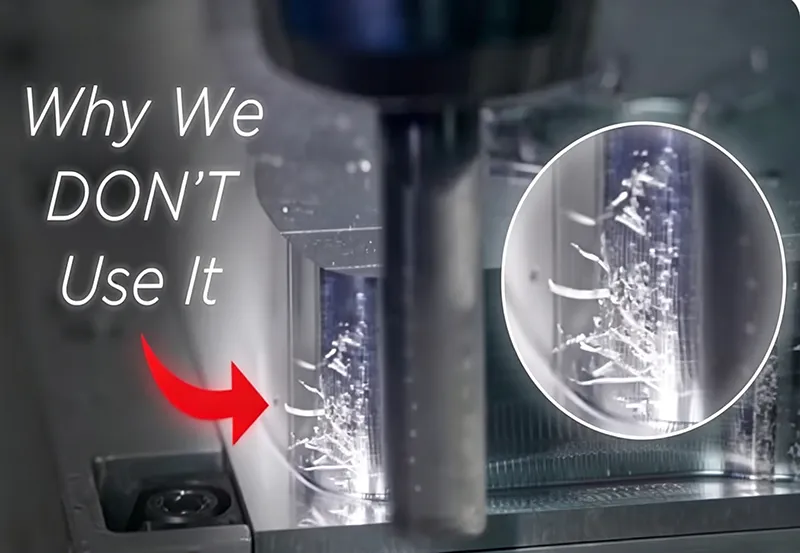
Climb milling (down milling) and conventional milling (up milling) are the two primary milling techniques, distinguished by the direction of cutter rotation relative to feed. Climb milling rotates the cutter with the feed direction, while conventional rotates against it. This difference affects chip formation, cutting forces, surface finish, and tool wear. In CNC machining, the chosen method can significantly impact part accuracy, tool life, and efficiency. This article will explain each method’s principles, compare their pros and cons, and discuss when to use one over the other in practice.
What Is Climb Milling?
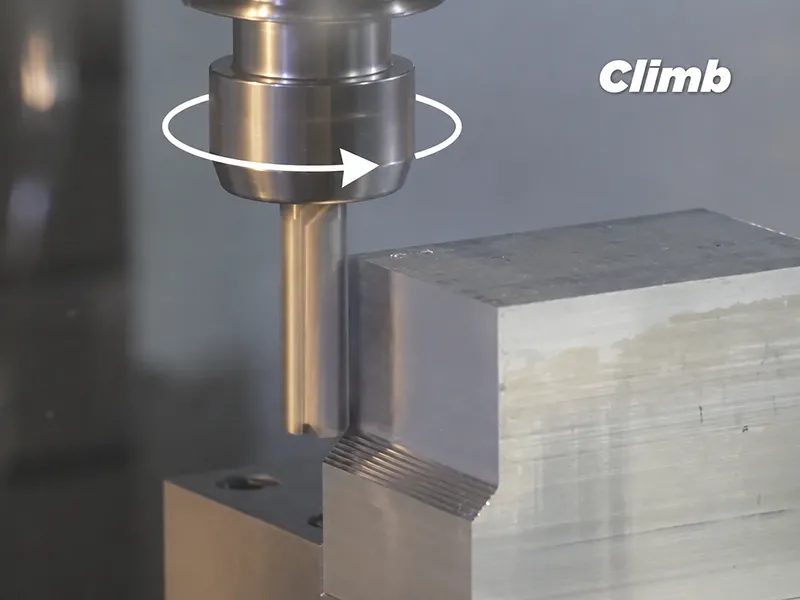
Climb milling (also called down milling) is when the milling cutter rotates in the same direction as the workpiece feed. In this mode, each tooth of the cutter engages the material at its maximum thickness and thins the chip as it exits. The chips are ejected behind the cutter, minimizing rubbing and recutting. Climb milling tends to pull the workpiece downward into the table, stabilizing it and often yielding a smoother surface finish and longer tool life. It is favored in CNC milling on modern machines with good rigidity and minimal backlash. However, because climb milling exerts a downward “pull,” it requires a stable setup to prevent the cutter from digging in or pulling the part out of position.
What Is Conventional Milling?
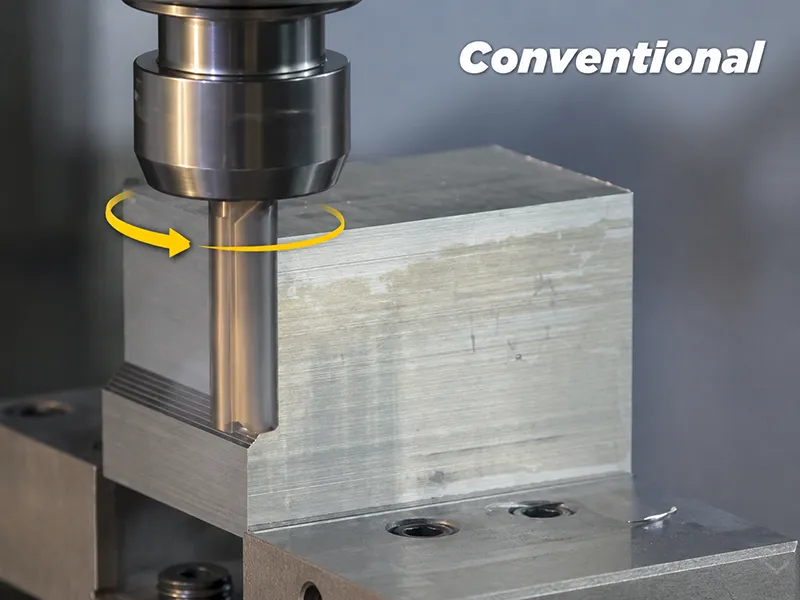
Conventional milling (also called up milling) has the cutter rotating against the direction of the feed. In this mode, the cutter rides up on the material, and chip thickness starts near zero and increases to maximum as the cutter exits. This means the cutting edge initially rubs on the surface before biting, often generating more heat and surface work-hardening. The cutting forces tend to push the workpiece upward and away from the cutter. Conventional milling is generally safer on less-rigid setups or older/manual machines without backlash compensation, because it is less likely to pull the workpiece out of the fixture. However, it usually produces a rougher surface finish and higher tool wear compared to climb milling.
Climb vs Conventional Milling: Main Differences
The key differences between climb and conventional milling stem from the cutter’s rotation relative to feed. The table below summarizes their main characteristics:
| Factor | Climb Milling (Down Milling) | Conventional Milling (Up Milling) |
|---|---|---|
| Also called | Down milling | Up milling |
| Feed direction | Same as cutter rotation | Opposite to cutter rotation |
| Chip formation | Starts thick → thins out (no rubbing) | Starts thin → thick (initial rubbing) |
| Cutting force | Pulls workpiece downward (into table) | Pushes workpiece upward (away from cutter) |
| Surface finish | Generally smoother | Generally rougher |
| Tool wear | Typically lower (cooler cut) | Typically higher (more heat & friction) |
| Machine requirements | Needs rigid, low-backlash machines | Safer on older/manual machines with backlash |
| Common use | CNC finishing, precision parts | Roughing, cast/forged parts, simpler setups |
Both methods are valid; one is not inherently “better” than the other. Climb milling excels on modern CNC machines with tight tolerances and good workholding, giving superior finish and tool life. Conventional milling is preferable in situations with unstable setups or rough materials (e.g. cast iron or hot-rolled steel) where the upward force helps avoid chip re-cutting or tool pull-in.
How Cutter Rotation and Feed Direction Work
The choice between climb and conventional milling is simply a matter of how the cutter spins relative to the feed. In climb milling, the cutter rotates with the feed direction, so each tooth grabs the material at maximum thickness and thins out. In conventional milling, the cutter rotates against the feed, so each tooth cuts from zero thickness upward. This orientation affects chip thickness profile, cutting forces, heat, and vibration. For example, climb milling’s downward force tends to hold the part down, whereas conventional’s upward force can lift it. In short, “the key difference is not the cutter itself, but how the cutter rotation interacts with the feed direction”.
Advantages of Climb Milling
- Superior surface finish. Climb milling typically produces a cleaner, smoother finish because the cutter meets the material at full thickness and then thins the chip.
- Lower heat and tool wear. Cutting starts at full chip load and gradually decreases, which spreads heat into the chip and away from the tool. This reduces rubbing and extends tool life.
- Efficient chip evacuation: Datron notes that in climb milling, chips are deposited behind the cut, helping reduce chip recutting and improve machining conditions. Cleaner chips mean less built-up edge and improved finish.
- Downward force stabilizes workpiece. Climb milling pulls the work downward against the table, reducing vibration and making fixturing simpler. This downward “clamping” force is especially helpful in horizontal milling.
- Suitable for high-speed finishing. The reduced cutting resistance and stable cutting action allow for higher feed rates and lighter cuts, which is ideal for modern CNC finishing passes.
- Prevents work hardening. The initial full-depth engagement minimizes rubbing, which helps avoid work-hardening of materials like stainless steel.
Climb milling is the modern go-to for finishing operations on rigid machines, providing precision parts with fine surface finish.
Limitations of Climb Milling
- Requires rigid machines and low backlash. Because the cutter pulls the workpiece, any play (backlash) in the machine can cause it to bite unpredictably. This can lead to oversized cuts or even tool “jump” on older machines.
- Risk of part shift. The downward pull of climb milling can drag a loosely fixtured workpiece into the cutter, causing chatter or a ruined part.
- Potential for tool dig-in. If not controlled, the cutter can dig into the material (especially with very soft or thin workpieces), damaging both tool and part.
- High initial cutting force. Because cutting starts at maximum chip thickness, the tool experiences its largest force immediately. This can overload weak machines or fixtures, causing deflection.
- Unsuitable for manual or old mills. On a machine with significant backlash (like a vintage Bridgeport), climb milling can be dangerous: the cutter can grab the part and move the table unexpectedly.
In practice, climb milling’s benefits come only when the equipment and setup are sufficiently rigid and backlash-free.
Advantages of Conventional Milling
- Better for machines with backlash. Because the cutter’s upward force pushes the workpiece down, conventional milling does not pull against backlash. This makes it safer on older mills or manual machines.
- Stable initial cut. The cutter engages with a thin chip that grows thicker, avoiding the sudden “bite” of climb milling. This can reduce vibrations or chatter on tricky materials.
- Handles rough surfaces. Conventional milling is advantageous on materials like cast iron or hot-rolled steel, where the thin-to-thick engagement is more forgiving on the cutter. It avoids digging into hard surface layers, reducing cutting-edge chipping.
- Less tool breakage risk. The force pushes the cutter away from the part, making tool breakage less likely during heavy roughing or on irregular surfaces.
- Easier fixture clamping. Since the force doesn’t pull the part up, weaker fixtures can still hold the piece securely. This is helpful when perfect clamping is not available.
Conventional milling is often used in roughing passes, on less advanced machines, or when machining very hard or brittle materials.
Limitations of Conventional Milling
- Rougher surface finish. The initial rubbing of the cutter on the material creates a poorer finish with more tear-out or ridges. Burrs and scallops are more likely.
- Higher heat and tool wear. Because the cutter slides on the surface before cutting, more friction is generated at the start of each tooth engagement. This increases heat and accelerates tool wear.
- Greater cutting forces on entry. The cutter pushes up against the workpiece, which can lift the part if not firmly clamped. Deflection and dimensional error can result if the setup is not stiff.
- Chip recutting. In conventional milling, chips are thrown ahead of the cutter into the cutting zone, so there is a higher chance of recutting swarf. This can degrade finish and promote built-up edge.
- Less efficient on modern CNC. Most CNC machines are optimized for the dynamics of climb cutting; conventional milling tends to be slower and more energy-consuming for equivalent stock removal.
Because conventional milling starts with a thin chip, it often needs a light “finish” pass afterwards to achieve tight tolerances.
When Should You Use Climb Milling?
Use climb milling when the machine and setup are up to the task and better finish or precision is required. For example:
- Rigid CNC setups: Modern CNC mills with backlash compensation or minimal play benefit from climb milling, exploiting its downward force for stability.
- Finishing passes: After roughing, use climb milling for final cuts to achieve smooth surfaces and tight dimensions.
- Materials prone to work-hardening: Metals like aluminum, stainless steel, or titanium often respond better to climb cuts, as these create less rubbing and distribute heat into the chips.
- High surface quality required: Any part needing a fine finish or close tolerances is a candidate for climb milling, since it “tends to create a smoother surface”.
In summary, choose climb milling when you have a well-clamped part on a rigid machine and want optimal finish and tool life.
When Should You Use Conventional Milling?
Use conventional milling when climb milling is risky or unnecessary. Typical scenarios include:
- Manual or old machines: If your mill has significant backlash or poor rigidity (e.g. a manual knee mill), conventional milling is safer.
- Rough, hard, or uneven stock: If you’re cutting hot-rolled steel, cast iron, or an uneven forged blank, conventional milling is preferred because it handles hard surface layers and avoids excessive tool engagement.
- Pre-roughing passes: For heavy material removal with lower precision needs, conventional cuts can be more predictable and less demanding on the setup.
- Weak workholding: If your fixture can’t firmly clamp the part, conventional’s upward force reduces the risk of the cutter pulling the part out of position.
In short, choose conventional milling for rough cuts, unstable setups, or challenging stock materials where climb milling could overload the machine.
Climb Milling vs Conventional Milling for Different Materials
- Aluminum (soft, ductile): Climb milling is usually best. It produces a cleaner cut with less burring. The chips form easily and evacuate well, improving finish.
- Stainless Steel: Stainless work-hardens and holds heat. Conventional milling is often better here; the thin-to-thick engagement avoids building up heat in the material and reduces initial tool impact.
- Steel (carbon steels): For mild steel, either method can work. In CNC finishing, climb is common for a better finish. For roughing or on older machines, conventional may be used. Hardened steels, however, favor conventional to ease entry and prevent cracks.
- Titanium: Titanium is reactive to heat and can have poor thermal conductivity. Climb milling is generally used to help pull heat away with the chips and improve chip clearance.
- Cast Iron/Hard Materials: Conventional milling is usually preferred for cast iron, forgings or case-hardened parts. The thin-starting chip of up-milling handles the variable hardness and grit better.
- Plastics & Composites: These are often best cut with climb milling, which avoids pulling or deforming soft materials. Climb cuts in plastics tend to give cleaner edges.
The choice often comes down to material properties: soft, ductile metals and plastics lean toward climb milling for finish, while hard, brittle, or uneven materials lean toward conventional milling for stability.
Climb vs Conventional Milling in Roughing and Finishing
- Roughing: The goal is rapid material removal. Many shops rough with conventional milling (especially if the stock is uneven or the machine is less rigid) because it offers gradual engagement. Once the bulk is removed, finishing passes are done with climb milling to achieve precision.
- Finishing: For final passes, climb milling is generally favored. Its cutting action yields the best surface quality and dimensional accuracy. On a rigid CNC, the downward force and clean chip formation of climb milling produce superior results for tolerances and appearance. In practice, a roughing toolpath (any strategy) is followed by a climb-milled finishing toolpath for the best outcome.
Thus, many CNC programs will combine both: a conventional or trochoidal roughing strategy, followed by climb milling for the finishing cuts.
How Milling Direction Affects Surface Finish and Tool Life
Climb milling usually reduces friction at the start of each cut, because the cutter begins with a thick chip and shears off material smoothly. This yields a finer surface and lower cutting forces, which translates to longer tool life. Heat is carried away in the chips, keeping the tool cooler.
Conventional milling, by contrast, starts each cut with rubbing of the tool on the surface. This increases friction and heat, causing more tool wear and often leaving a worse finish. More burrs can form and more tooling may be required to rework the surface. In short, climb milling tends to give better finish and less wear, while conventional often requires additional finishing to match the quality.
Common Mistakes When Choosing Milling Direction
- Always using climb milling: Assuming climb is always best can be dangerous on machines with backlash or poor clamping.
- Ignoring backlash: Failing to account for lead-screw play on a machine can make climb milling disastrous (tool pulling the work into the gap).
- Climb on unstable setups: Using aggressive climb cuts on loosely fixtured or thin parts can result in chatter or the part being pulled out of position.
- Misapplying finish feeds on rough stock: Trying to get a perfect finish while still roughing a casting or scale-covered material can overload the tool.
- Not distinguishing rough vs finish: Each stage may need a different approach; neglecting this can compromise both speed and quality.
- Ignoring material behavior: For example, climbing into a hardened or rough surface (like hot-rolled steel) can chip the cutter.
- Mismatched tooling/parameters: Using the wrong cutter geometry or feeds/speeds can negate the advantages of the chosen method.
A good rule is to assess machine condition, part material, and finish needs before deciding. If in doubt on an older mill, conventional milling is safer; on a stiff CNC, climb milling often pays off.
Design and Machining Tips for Better Results
- Check machine rigidity and backlash. Ensure your mill and table are tight. If backlash is present, avoid pure climb milling or use modern controls with compensation.
- Secure the workpiece firmly. Good fixturing is essential for climb milling. Use heavy clamps, spoilboards, or fixtures that can resist the downward pull of the cutter.
- Separate roughing and finishing. Plan toolpaths so that heavy cuts come first, then switch to a climb-milled finishing pass for critical surfaces.
- Choose tooling for the task. Sharp, well-ground tools are especially important for climb milling. Consider helix angle and coatings suited to the material (e.g., high helix for soft metals).
- Plan for chip evacuation. Especially on climb cuts, make sure chips are cleared away (through coolant or air blast) to avoid recutting or rubbing.
- Leave finishing allowance. Don’t try to machine to final size in one go if not necessary. A small extra stock can be cleaned up with a final climb pass.
- Adjust feeds and speeds wisely. A climb cut can often run at higher feedrates, but verify that your machine can handle the dynamics.
- Consider cutting direction with datum/features. When tolerancing and surface finish matter (e.g. a bearing surface), highlight that surface for a climb finish in the CAM plan.
By matching the milling direction to the part design and machining conditions, you can improve surface quality, reduce rework, and extend tool life.
Conclusion
Climb milling and conventional milling are two complementary milling strategies. The core difference is simply whether the cutter turns with or against the feed direction. Climb (down) milling pulls the tool into the work and produces a smooth finish with less tool wear, making it ideal for rigid CNC machining and finishing operations. Conventional (up) milling pushes the tool into the work, which is safer on manual or backlit machines and better for roughing hard or uneven stock. The best choice depends on machine rigidity, material, fixturing, and the part’s tolerance and surface requirements. For CNC machined parts, a common approach is to rough with conventional milling if needed, and then finish with climb milling to achieve the desired precision and quality. Clear drawing instructions and appropriate tooling will help prevent errors and yield optimal machining results.
FAQ About Climb vs Conventional Milling
What is the difference between climb milling and conventional milling?
The difference lies in cutter rotation vs. feed direction. In climb milling the cutter turns with the feed, engaging the work at full chip thickness and thinning the chip. In conventional milling, the cutter turns against the feed, starting with a thin chip that grows. This leads climb milling to pull the part down (better finish) and conventional milling to push it up (safer on rough setups).
Is climb milling better than conventional milling?
Not always. Climb milling often gives superior surface finish and lower tool wear (fewer chips recut, less heat) on stiff, backlash-free machines. Conventional milling can be more stable on older machines or with imperfect fixturing, and may be preferable for very hard or rough materials. The “better” method depends on the machine condition and job requirements.
When should I use climb milling?
Use climb milling on modern CNC machines that have good rigidity and backlash control, especially for finishing passes on critical features. It’s ideal when you need the best surface finish and tight tolerances. Climb milling is also preferred for materials that tend to heat up or work-harden (e.g. aluminum, stainless, titanium) because it reduces rubbing and carries heat away with the chips.
When should I use conventional milling?
Use conventional milling when machine or setup conditions make climb risky. For example, on manual mills or machines with significant backlash, conventional prevents the cutter from pulling the work into the play. It’s also advisable for roughing hard or uneven stock (like castings or hot-rolled steel), or when fixturing cannot fully resist the forces of a climb cut.
Which method gives a better surface finish?
Generally, climb milling yields a better surface finish. Because the cutter in climb milling cuts from thick to thin, there is less rubbing and a cleaner shear on the material. Conventional milling often leaves a rougher finish since the cutter begins with a sliding action. However, the actual finish also depends on tool sharpness, feeds/speeds, and machine stability.