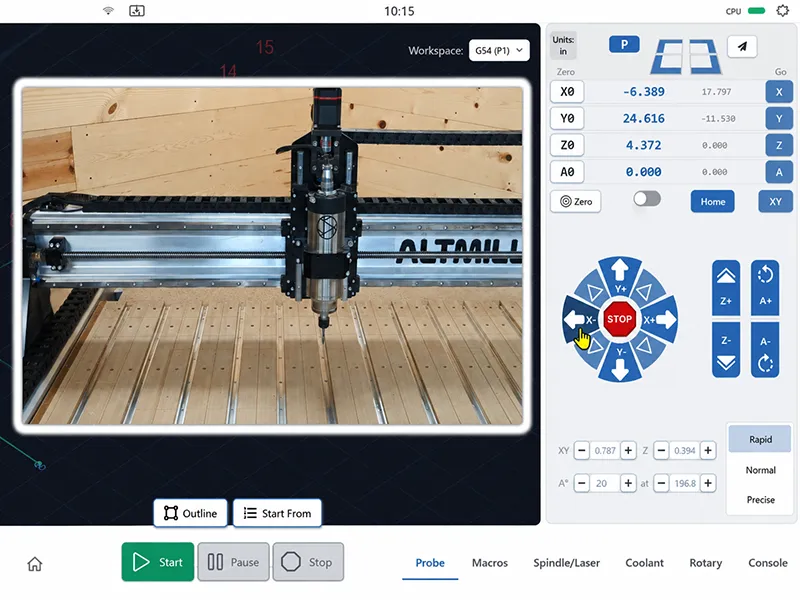
A CNC router is a computer-controlled cutting machine that uses a high-speed rotary spindle and router bits to remove material. It is designed to carve complex shapes out of flat stock. These routers excel at machining large panels and softer materials – for example, wood, plastics, foam, composites, and even some soft metals. Common CNC routing tasks include cutting outlines, engraving patterns, drilling holes, and pocketing. Compared to a handheld router, a CNC router offers much more repeatable and automated cutting, making it useful in CNC machining projects that require consistent production runs and complex designs. This guide explains how CNC routers work, their main parts, compatible materials, typical operations, advantages and limitations, and how they differ from CNC mills and laser cutters. We also cover applications, design tips, cost factors, and tips on selecting a router supplier.
What Is a CNC Router?
A CNC (Computer Numerical Control) router is essentially an automated version of the wood router. It uses a computer-controlled gantry and a high-speed spindle to move a rotating cutting tool along programmed paths. In operation, servo motors follow G-code instructions to drive the spindle and router bit through the workpiece. This means the router’s motion in the X, Y (horizontal) and Z (vertical) axes is fully controlled by the computer. The result is precise cutting, carving, or engraving of the material according to the digital design. CNC routers typically have a gantry-style frame where the spindle can move left-right (X-axis) and front-back (Y-axis), while a Z-axis allows for shallow depth changes.
Because of their design, CNC routers are best suited to flat, relatively soft materials. They “have been designed specifically to carve out complex shapes from soft materials like wood, plastic, foam, [and] soft metals”. In practice, that means plywood, MDF, hardwood or softwood boards, solid wood panels, and composite sheets are commonly routed. Acrylic, ABS, PVC, HDPE and other plastics also route well, as do foams (EPS, PU, modeling foam, etc.) and fiberglass or carbon-fiber composite panels. Softer non-ferrous metals like aluminum, brass or copper can be routed with the right setup, though CNC routers are not typically used on hardened steel or ultra-precision metal parts. In summary, CNC routers excel at 2D or shallow 3D machining of large panels and prototypes in wood, plastic, foam and similar materials, providing much more stability and repeatability than manual routing.
How Does a CNC Router Work?
CNC routing follows a multi-step process combining CAD design and automated machining:
- CAD Design: A part is first drawn in CAD software (2D or 3D).
- CAM Programming: The CAD model is imported into CAM software, which creates toolpaths and the NC code or G-code used to drive the CNC machine (the CNC instructions) for each operation.
- Material Setup: The raw stock (panel, board, etc.) is secured flat on the router’s table using clamps, fixtures or a vacuum table. Proper workholding is crucial to prevent vibration or movement.
- Tool Selection: The operator loads the appropriate router bit (endmill) into the spindle. Bit types vary (straight, spiral, V-bit, ball-nose, etc.) depending on the cut.
- CNC Routing: The CNC controller reads the G-code and moves the router along X, Y, and Z axes. The spinning bit follows the programmed paths, performing cuts such as contouring profiles, drilling holes, milling pockets, or 3D carving.
- Inspection & Finishing: Once cutting is complete, the part is removed and inspected. Often additional surface finishing, deburring, sanding, polishing, or assembly is done after routing.
Workflow example: Design in CAD, generate G-code via CAM, secure material and bits, then let the CNC router cut along the X/Y/Z axes.
In operation, CNC routers work on a Cartesian coordinate system. A typical 3-axis router moves the tool left-right (X-axis), front-back (Y-axis), and up-down (Z-axis). More advanced machines may add a rotary axis (4th axis) or tilt the head (5th axis) for complex geometries. High-speed spindles (10,000–60,000 RPM) drive the cutting bits. After machining, minimal manual work is needed: parts may simply be removed from the bed, tabbed parts are separated, and edges cleaned.
Main Parts of a CNC Router
A CNC router is built from several key components that together determine performance:
- Frame/Gantry: A rigid welded steel or aluminum frame supports the machine. Its rigidity (stiffness) is crucial for accuracy and precision. The gantry spans the frame and carries the moving parts.
- Worktable/Bed: A flat table (often vacuum or with T-slot fixtures) on which the material is placed. Vacuum tables or clamping kits hold panels in place during cutting. Some routers have T-slot tables or pallet systems for versatile fixturing.
- Spindle (Router): The high-speed motor that holds and spins the cutting tool. Spindles vary in power (e.g. 2–10+ kW) and speed, affecting how fast and deep the router can cut. The spindle is typically mounted on the gantry and moves in the Z-axis.
- Router Bits: The actual cutting tools inserted into the spindle. Bits come in many shapes – straight, spiral (up-cut, down-cut, compression), V-groove, ball-nose, chamfer, etc. – each suited to different cuts (see next section).
- CNC Controller: The computer/electronics that interpret G-code and drive the machine. It controls the stepper or servo drive motors for X, Y, Z motion and regulates spindle speed. Modern controllers allow features like auto tool change (ATC) and look-ahead for smoother motion.
- Drive System: Precision stepper or servo motors (and ball screws or rack & pinion/linear rails) move the gantry and table. Professional routers use linear guides and heavy screws for smooth, backlash-free motion.
- Vacuum/Clamping System: Many routers include a vacuum table or dedicated clamps/fixtures to secure parts without manual fixtures. A powerful vacuum pump can hold foam, wood panels or composites flat during cutting.
- Dust Collection: Because routing produces chips and dust (especially wood and composites), routers often have a dust extraction system with a hood around the spindle. Good dust collection is important for safety and finish quality.
- Automatic Tool Changer (Optional): Higher-end routers may have an ATC magazine to switch bits automatically during a job, enabling multiple operations without stopping.
Overall, the frame rigidity, spindle power, table size, tooling and workholding system determine the router’s capability. A large, heavy frame with a powerful spindle can cut thicker stock and tougher materials with better accuracy. In contrast, a small hobby router has less rigidity and power.
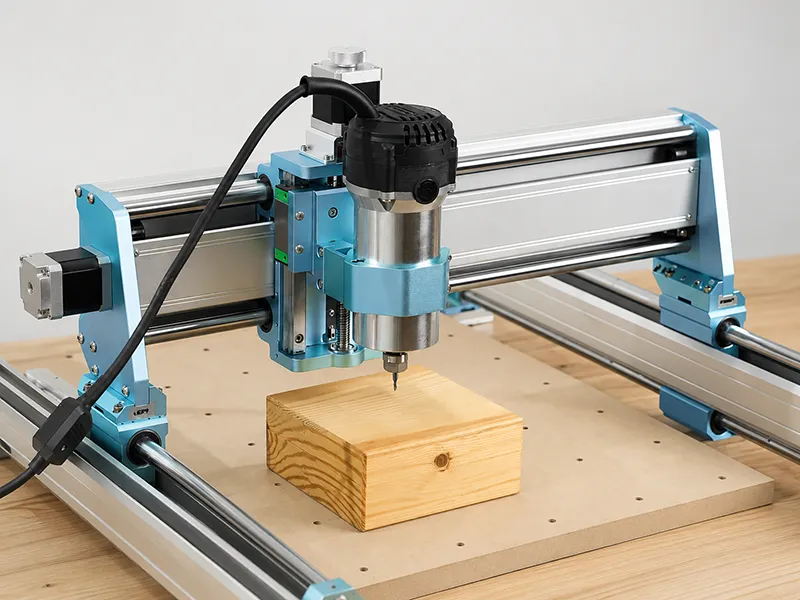
Key components: a rigid frame supporting the gantry, a flat table for material, a spindle for the cutting tool, and a CNC controller computer that drives the motion.
What Materials Can a CNC Router Cut?
CNC routers can handle a wide range of CNC routing materials, especially non-ferrous and relatively soft materials. Common groups of materials include:
- Wood: Plywood, MDF (medium-density fiberboard), hardwood (oak, maple, etc.), softwood (pine, cedar), furniture panels, cabinet boards, plywood cabinetry stock, solid wood slabs. CNC routers are widely used in cabinetry, furniture manufacturing and carpentry.
- Plastics: Acrylic (PMMA), ABS, PVC, HDPE, polycarbonate, nylon, Delrin (acetal), laminates, phenolic board and other thermoplastics. Routing plastic requires attention to chip removal and heat; often down-cut or compression bits are used to minimize melting and tear-out.
- Foams: Expanded polystyrene (EPS), polyurethane (PU) foam, modeling foam (EVA, polyurethane tooling foam), packaging foam. Foam cuts very quickly at high speeds and is used for molds, prototypes, and insulation.
- Composites: Fiberglass-reinforced plastics (FRP), carbon-fiber sheets/panels, composite sandwich panels. Composites are abrasive to tools and produce hazardous dust, so CNC routers cutting them must have strong dust collection and often use specialized carbide tooling.
- Soft Metals: Non-ferrous metals like aluminum, brass, copper and thin magnesium or soft zinc alloys. Routers can machine light alloys, especially with rigid setup and proper cooling or chip evacuation. However, CNC routers cannot efficiently cut hardened steel or very thick metal – those are jobs for milling machines or plasma/waterjet .
CNC routers are primarily limited to non-metallic (wood/plastic/foam) and soft-metal materials. Xometry notes routers “can also cut softer metals such as brass, aluminum, and in some cases, steel,” but “CNC routers are rarely used to cut harder materials like steel”. Likewise, DATRON points out routers excel with soft, thin stock (wood, plastics, foam, aluminum) but rely on other machines for hard metals.
In practice, when routing composites or plastics, factors like dust control, tool wear and feed rates must be carefully managed. For example, cutting carbon-fiber panels requires special filters and personal protection due to toxic dust. Always consider the material’s hardness, abrasiveness, and thermal properties when planning a CNC routing job.
Typical materials: wood (plywood, MDF, hardwood/softwood), plastics (acrylic, ABS, PVC, etc.), foam (EPS, PU, modeling foam), composites (fiberglass, carbon fiber), and soft metals (aluminum, brass, copper). Hard steels are usually avoided.
Common CNC Routing Operations
CNC routers are capable of many machining operations. The most common include:
- Profile Cutting: Cutting along the outer contour of a part to separate it from the sheet. Used to cut shapes out of plywood, MDF, plastic panels, signage, and furniture components.
- Pocketing: Removing material from an interior area to create cavities or recessed regions. Pocketing is used for dadoes, sink openings, weight reduction areas, or leveling surfaces.
- Drilling: Boring holes (through-holes or blind holes) into the workpiece. CNC routers can accurately drill mounting holes, dowel holes, screw holes or vent holes at programmed positions.
- Slotting: Cutting long narrow grooves or slots in a board’s thickness. Useful for T-slots, slides, ventilation slots, or joinery features.
- Engraving: Shallow carving of text, logos, graphics or patterns on the surface. Using fine V-bits or small end mills, routers can engrave decorative lettering in wood, plastic, or even stone-like materials.
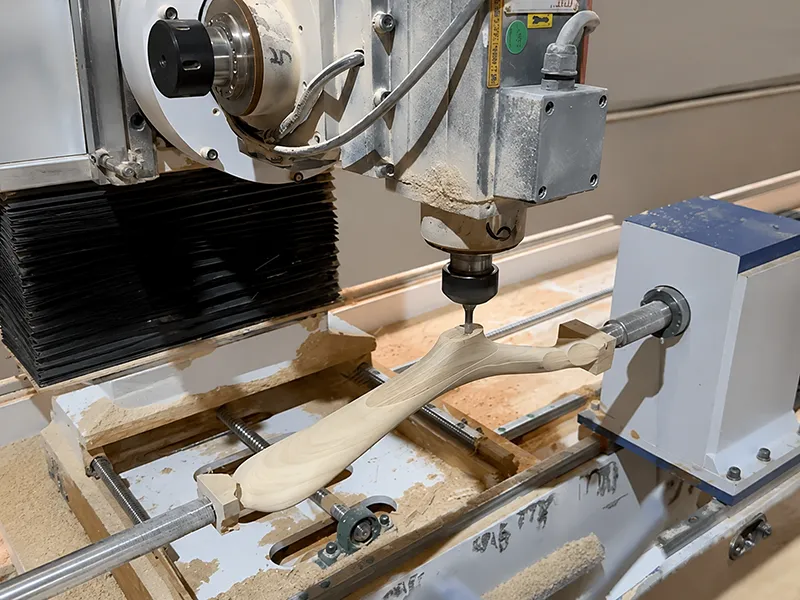
- 3D Contouring (Carving): Milling of true 3D shapes and surfaces. By following complex 3D toolpaths, routers can sculpt relief carvings, mold patterns, foam models and other complex forms. Ball-nose and tapered carving bits are commonly used for this.
Each operation is defined in the CAM software and executed automatically by the router. CNC routers handle these tasks more quickly and consistently than manual routing. In fact, CNC routers can “perform a variety of operations, such as cutting, carving, milling, drilling, slotting, chamfering, and more”. This versatility makes them essential in many shops.
CNC routers can execute diverse operations (cutting, drilling, pocketing, engraving, etc.) in one program, enabling complex parts with multiple features.
CNC Router Bits and Cutting Tools
The choice of router bit is crucial for each operation and material. Common CNC router bit types include:
- Straight Bits: Flat-end cutters for straight plunges and slot cuts. Good for general purpose cuts, grooves, and dadoes in wood or plastic.
- Spiral Bits: End mills with spiral flutes. These come in upcut, downcut or compression variations. Upcut bits draw chips up and out of the cut (good for clearing chips), while downcut bits push chips down for a clean top edge. Compression bits combine both – their upper flutes run down and lower flutes run up, giving a smooth finish on both top and bottom of plywood or laminates. Spiral bits are widely used in CNC routing for clean cuts and efficient chip evacuation.
- V-Bits (V-Groove): V-shaped profile bits for engraving and decorative grooves. A common example is a 90° V-bit for sign-carving. These bits carve V-shaped channels or lettering. For instance, “V-Groove bits cut V-shaped decorative grooves or lettering” and are “go-to for sign makers and panel detailing”.
- Ball-Nose Bits: These have a rounded end and are ideal for 3D contouring and carving smooth curved surfaces. The radius of the ball determines the smoothness of the finish; smaller balls give finer detail, larger balls remove material faster.
- Chamfer Bits: Angled bits (e.g. 45°) used to cut bevels or chamfers on edges, or to create decorative angled profiles. They can also be used to make V-grooves by joining two chamfer cuts.
- Engraving Bits: Very small, pointed bits (often carbide) for fine detail engraving of text and images. These include 30°, 60°, or 90° engravers for precise shallow cuts.
- Compression Bits: A type of spiral bit with both up and down flutes that squeeze chips out towards the center, ideal for laminated plywood or acrylic to prevent tear-out on both faces.
- Specialty Bits: Includes core-box bits (for round-bottom grooves like juice channels), dovetail bits, rounding-over bits, etc., depending on the application.
Choosing the right bit depends on material and feature. For example, cutting acrylic typically requires very sharp bits and lower feeds/speeds to avoid melting. Softwood and MDF can use standard carbide bits. When routing aluminum, rigid setup and coated carbide or high-speed steel bits are used along with coolant or air blasts. Always use appropriate feed rates to avoid burning or tear-out.
Example bits: straight end mills, spiral up/down/compression bits for clean cuts; V-groove bits for engraving and decorative lettering; ball-nose bits for smooth 3D contour carving (not shown).
CNC Router vs CNC Mill
CNC routers and CNC mills both remove material with computer control, but they differ in design and best uses. In general:
| Factor | CNC Router | CNC Mill |
|---|---|---|
| Main Use | Large panels and soft/medium materials | Hard metal and precision parts |
| Typical Materials | Wood, plastics, foam, composites, soft metals | Steel, stainless, aluminum, brass, some plastic |
| Machine Rigidity | Lower (gantry frame), focused on speed | Higher (heavy frame), focused on precision |
| Spindle Speed | Usually very high RPM (thin bits in soft stock) | Moderate-high RPM (strong cutting torque) |
| Cutting Force | Lower force (thin cuts) | Higher force (for tough materials) |
| Work Area | Often large (gantry design spans table) | Usually smaller (bed moves under spindle) |
| Precision | Moderate (typ. ±0.005″ tolerance) | High (tight tolerances) |
| Common Parts | Signs, panels, furniture components, plastic parts | Brackets, housings, engine parts, molds |
In practice, CNC routers are optimized for big, flat work and lighter materials, while CNC mills are built to handle heavier materials and finer detail. Xometry notes that a CNC mill “is able to machine harder materials, like steel, as well as wood and plastic while maintaining higher levels of accuracy,” whereas CNC routers have larger cutting areas and suit large plates. DATRON similarly observes that a mill’s rigidity allows it to cut with greater precision, whereas routers have limited Z-axis depth but can achieve very high speeds on a large table. In short, use a router for large, softer parts (cabinet panels, plywood parts, signs) and use a mill for small precision metal parts (brackets, aerospace/engine parts, tooling).
Key difference: mills are heavy-duty/rigid for hard metals and tight accuracy; routers excel at large-area, high-speed cuts on softer materials.
CNC Router vs Laser Cutting
CNC routing and laser cutting are two very different technologies:
- Cutting Method: A CNC router cuts mechanically with a spinning bit, removing material. A laser cutter uses a focused laser beam (heat) to vaporize or melt material. This fundamental difference means routers require physical clamping of the material, whereas lasers can often cut without clamps (the laser penetrates) – though precision still often requires fixturing.
- Material & Thickness: Routers can cut much thicker stock and 3D shapes. Desktop CNC routers can often handle dozens of millimeters of wood or plastic (limited only by their Z travel), whereas typical desktop lasers are limited to cutting 6–10 mm of wood or acrylic (beyond that, multiple slow passes or stronger lasers are needed). Lasers generally cut only at the surface (no pocketing or deep relief).
- Precision & Edge Quality: Lasers produce a very fine kerf (thin cut width) and can make crisp curves/engravings. However, laser cutting can char, burn or melt the edges of wood and plastic, and certain plastics (like PVC) release toxic fumes. CNC routers leave a natural wood edge or clean plastic edge (though they can tear wood grain if feeds/speeds are wrong).
- 3D Capability: Routers can produce true 3D contours and pockets by plunging the bit. Laser cutters are typically 2D (or at most 2.5D engraving). For joinery (dadoes, mortises) and structural woodworking, routers are vastly more versatile.
- Speed: For fine cutting and engraving of thin sheet materials, lasers can be faster and more automated. For example, routing 12 mm plywood might take 30–60 seconds per cut, while a laser may need 3–5 minutes with multiple passes.
- Operational Concerns: Lasers require safety measures for high-power light (interlocks, eyewear). Routers require dust collection for chips and noise protection (routers are relatively loud).
In summary, choose a laser for very thin, detailed cuts or fast high-precision 2D cuts (e.g. engraving acrylic signs with fine detail). Choose a CNC router for thicker wood/plastic parts, any required 3D shaping, and where burning from a laser would damage the look or material.
Main difference: routers cut with physical bits (good for thickness/depth), lasers cut with heat beams (good for fine, thin cuts).
Advantages of CNC Routers
CNC routers offer many benefits, especially over manual routing:
- High Productivity & Repeatability: Once programmed, a CNC router can run continuously, producing identical parts in batch. It can run faster than a human operator and even operate unattended, increasing throughput. This automation drastically reduces manual labor time.
- Complex Geometries: Routers effortlessly handle intricate 2D and 3D shapes. Complex carvings, decorative reliefs, and detailed patterns that would be tedious or impossible by hand are easily produced.
- Versatility: A single CNC router can cut, carve, drill, pocket, and engrave all in one machine. By changing bits (manually or via an ATC), it performs multiple processes on a part without re-fixturing. It works on a wide range of materials (wood, plastics, foam, composites) and part sizes.
- Precision and Quality: CNC control yields precise cuts to within a few thousandths of an inch (often ~±0.005″) and consistent quality across a production run. Decorative edges, lettering, and finished contours are much cleaner than rough manual cuts.
- Lower Operator Skill & Labor Costs: Operators need not manually guide the tool or maintain constant eye-hand coordination. Once trained on software, one person can run multiple machines. Physical fatigue and human error are greatly reduced.
- Material Optimization: CNC software can nest parts efficiently on sheet stock, minimizing waste. The accuracy of CNC cuts also reduces scrap from mistakes.
- Rapid Prototyping: CNC routing provides fast turnaround from CAD to physical prototype. Design changes require just a CAM update and new cut, enabling quick iteration.
- Cost-Effectiveness: For large-format wood/plastic jobs, CNC routers are relatively inexpensive compared to large milling centers. They are often more affordable for woodshops or small shops requiring panel cutting capabilities.
Example benefit: CNC routers can run continuously and faster than manual tools. “Compared to handheld routers, CNC routers can run faster, more continuously, and even automatically around the clock,” boosting productivity.
Limitations of CNC Routers
Despite their strengths, CNC routers have limitations:
- Lower Rigidity: Routers are generally less rigid than mills. The gantry style and lighter build mean they cannot remove material as aggressively. This limits deep or heavy cuts.
- Not for Hard Metals: CNC routers are not suited for machining hardened steel or very hard alloys. Even aluminum or brass routing requires care. High-torque milling machines are preferred for tough metals.
- Accuracy: While adequate for many tasks, router tolerances are coarser than CNC mills. Fine precision work (micromachining, fine threads, extremely tight fits) is better done on a milling machine.
- Dust and Chips: Routing wood, composites, and plastics produces a lot of chips and dust. Effective dust extraction is required to maintain visibility and machine life. Operators need PPE against wood and composite dust.
- Noise: Routers can be quite loud (spindle noise plus vacuums). Hearing protection is recommended in an active shop.
- Setup Overhead: Each job requires CAD/CAM programming and setup. For very simple one-off cuts, this overhead can outweigh manual methods. Fixturing irregular shapes can also be time-consuming.
- Thin or Flexible Parts: Very thin or small pieces may vibrate or lift if not well supported. Tabs or sacrificial edges are often needed to hold small parts in place during cutting.
- Tool Deflection: Long or small-diameter bits can deflect under load, affecting edge quality and precision. The choice of bit and feed/speed must account for this.
- Material Sensitivity: Certain plastics may melt or “chip” if feeds/speeds are not optimized, and edges of materials like MDF can fray if cutters are dull.
In short, routers work best when matched to the right job: large, softer materials and moderate tolerances. They are not “magic bullet” machines – for heavy metals, ultra-high precision, or extremely deep cuts, other machining processes are more appropriate.
Key drawbacks: Routers generate dust/noise and are less rigid than mills. They “don’t provide the same level of accuracy” as mills and have shallower cut depths. They also work best with softer materials.
CNC Router Machining Tolerances
A CNC router can be quite precise, but achievable tolerance depends on many factors. Under good conditions, CNC routers often hold around ±0.005 inch (±0.13 mm) per dimension. Xometry notes this as a standard repeatability for many routers. However, real-world tolerance varies with machine quality, material behavior, tooling, and workholding. For example, wood parts can expand or warp with humidity; plastic parts may flex or melt under heat; thin sheets can vibrate. Tool deflection in long cuts also adds error.
For most woodworking and plastic parts, router tolerances of a few thousandths of an inch are attainable. Composites and aluminum parts generally achieve similar accuracy, but with more setup care. In any case, if a part requires very tight tolerances or precision metal geometry (like engineered mechanical parts), CNC milling is usually the better choice. A mill’s rigid frame and spindle yield smaller tolerances on hard materials.
Typical router accuracy: on the order of thousandths of an inch. Xometry cites a standard CNC router tolerance of about ±0.005″ (0.13 mm). Actual results depend on material, tool and setup.
Common Applications of CNC Routers
CNC routers are used in countless applications. Some common ones include:
- Signage & Lettering: Cutting and engraving wooden or plastic signs, 3D letters, and logos. Routers cut panels and carve raised or recessed text and graphics.
- Furniture & Cabinetry: Machining cabinet panels, decorative doors, drawer fronts, chair and table components. Routers produce the cutouts and contours for cabinets and furniture.
- Display Fixtures: Cutting display panels, stands, and molds for retail store fixtures and point-of-purchase displays.
- Plastic and Acrylic Parts: Fabricating machine enclosures, panel covers, knobs, and other plastic components. For example, control panel overlays and nameplates.
- Foam Prototypes & Molds: Carving foam shapes for prototypes, custom packaging inserts or sand casting patterns.
- Composite Panels: Machining composite sandwich panels for aerospace or construction (e.g. fiberglass or carbon-fiber boards).
- Aluminum Panels: Cutting and drilling aluminum sign panels, architectural panels, and components.
- Architectural Models: Creating scale models of buildings, sculptures, and complex geometric shapes out of foam, wood or plastic.
- Decorative Components: Crafting moldings, trims, relief carvings, and inlays used in interior design.
- Jigs & Fixtures: Manufacturing custom jigs, templates, cutting guides, and workholding fixtures for other processes. Routers excel at making wood or plastic templates and gauge plates.
For example, Xometry notes that CNC routers are widely used in furniture making (cabinet parts, carvings), mold pattern making (wood patterns for casting), packaging (foam inserts for product protection), and advertising (engraved signs). In short, any field that needs custom-shaped parts in wood, plastic, foam or similar can use CNC routing.
Typical uses: wood furniture parts, cabinet panels, engraved signs, foam packaging, plastic fixtures, and any custom-shaped panel or pattern (Xometry lists furniture, mold patterns, packaging, and advertising among CNC router applications).
CNC Routing for Different Industries
CNC routers serve a variety of industries:
- Furniture & Woodworking: Cabinet doors, decorative wood panels, furniture legs, moldings, and trim are routed from plywood, MDF or solid wood.
- Advertising & Signage: Custom signs, retail displays, point-of-sale stands, and illuminated letter blanks are cut and engraved. Companies make wooden or acrylic letters and logos with routers.
- Electronics: Router-machined plastic or fiberboard panels for electrical enclosures, circuit board holders, insulation sheets, and dashboard panels. Also used for cutting plastic instrument housings.
- Automotive: Prototyping body panels and interior trim from foam or composite; molding prototypes and plug models from wood or foam; routing instrument panel mockups. Routers cut plastic and foam parts for concept vehicles.
- Aerospace: Cutting lightweight composite panels for aircraft interiors, tooling boards (wood/composite patterns for composite layups), and foam cores. Routers carve aerodynamic shapes from soft models.
- Industrial Manufacturing: Making jigs, fixtures, templates, and guards for machinery. Custom machine covers, plastic ducts, and industrial panel enclosures.
Each industry leverages routers for the materials and scales it involves. For instance, cabinet shops need routers for plywood door panels, while model-making shops use routers to carve foam prototypes.
Design Tips for CNC Routed Parts
When designing parts to be CNC-routed, consider these guidelines:
- Tool Diameter: Any internal corner or hole radius must be at least the radius of the smallest tool. Sharp internal corners need to be rounded to fit the endmill.
- Material Thickness: Use material thickness compatible with the router’s Z-axis travel. Avoid extremely thin sheets (they may warp) or overly thick stock beyond the machine’s capacity.
- Wall/Slot Widths: Avoid very thin walls or tiny slots; they can break or burn out. Features should be wide enough for rigidity and tool access.
- Tabs and Hold-Downs: For small parts, include tabs or anchors in the design so the cut piece doesn’t fall away. Or plan for double-sided machining.
- Clamping Area: Ensure there is enough material at edges to clamp the part down. Parts with zero-margin cuts may require special fixtures or vacuum holes.
- Grain Direction (Wood): If routing wood, consider grain orientation to avoid tear-out or excessive chipping.
- File Formats: Provide CAD files in common formats (DXF, DWG for 2D, or STEP/STL for 3D) that your machine software can use.
- Label Critical Dimensions: Clearly note any tight-tolerance or critical dimensions in the drawing so the machinist can prioritize them.
- Draft Angles: If cutting molds or patterns for casting, include draft angles to allow part release.
In general, good CNC design matches the tool size and machine capability. For example, leave tool radius “relief” at sharp corners, and avoid overly delicate features unless absolutely necessary. Matching design to machining (e.g. adding corner radii ≥ tool radii, providing escape holes for tabs) will ensure successful routing.
CNC Routing Cost Factors
Several factors influence CNC routing cost, including material, cutting length, toolpath complexity, setup time, quantity, and finishing:
- Material Type and Thickness: Harder or more expensive materials (e.g. hardwood or aluminum) cost more. Thicker stock takes longer to cut.
- Part Size: Large parts take more material and longer machining time. Very large panels may require special handling.
- Cutting Length/Area: Total toolpath length (all profiles, pockets, slots) affects machining time. Complex shapes with many curves or cavities increase cost.
- Cutting Complexity: The number of features (holes, pockets, contours) and their intricacy. 3D surface work is more time-consuming than simple 2D cuts.
- Tool Changes: Each unique tool used adds time. Parts requiring multiple bits (e.g. one for roughing, one for finishing, engraver, drill) will incur additional setup and machining overhead.
- Setup and Programming: Non-recurring engineering (CAM programming, fixturing setup) adds to cost, especially for one-offs.
- Quantity: Small batches or prototypes have higher per-unit cost than larger production runs due to fixed setup time.
- Finishing: Post-machining work like sanding, painting, or assembly increases cost.
- Tolerance Requirements: Tighter tolerance demands careful machining and inspection, raising cost.
- Logistics: Special packaging for large or delicate routed parts can add handling costs.
When quoting routing, suppliers typically calculate machine time based on feed rates and toolpath length, plus material and labor. Optimizing the part design (e.g. nesting multiple parts efficiently) and minimizing complexity can reduce the price.
When Should You Choose a CNC Router?
Choose a CNC router if:
- Material Suits It: The part is made of wood, plastic, foam, composite, or non-hardened metal. (Routers excel on these materials.)
- Large/Panel Size: The part is large or panel-like, larger than what a small mill could handle efficiently. CNC routers often have very large tables.
- Moderate Precision: The tolerance requirements are moderate (±0.005″ or so), not ultra-tight.
- Multiple Operations: The job requires cutting, engraving, drilling, or pocketing in the same part. A router can do all these in one setup.
- 3D or Relief Shaping: The part has 3D contours or relief shapes (like a carved sign or mold) that a laser or table saw can’t do.
- Prototyping or Small Batch: You want faster turnaround than manual routing or saws, and better repeatability.
- Budget: For large-format, softer-material parts, a CNC router is usually less expensive per part than a milling process.
You should not choose a CNC router if:
- Material is Hardened Steel: If the part is steel or requires machining of high-strength alloys, use a CNC mill.
- Ultra-High Precision Needed: For very tight tolerances or finish (e.g. precision engine parts), a mill is better.
- Heavy Metal Removal: Deep or heavy-duty metal cuts (slots in thick metal, for example) are beyond a router’s capability.
- Better Alternatives: Some parts are better done by other processes: a laser cutter for thin detailed cuts, an EDM for small deep holes, or waterjet for thick metal.
In summary, use a CNC router when the part fits the router’s sweet spot (large, softer material, 2D/3D contouring) and where its advantages outweigh limitations. If the design is a heavy metal bracket or requires micron tolerances, opt for a mill or other specialized machine.
For example, routers are ideal for wood/plastic parts, whereas “a CNC mill is able to machine harder materials, like steel,” with higher accuracy. Hard metals or very tight tolerances suggest milling instead.
How to Choose a CNC Routing Supplier
When selecting a CNC routing service or supplier, consider these criteria:
- Machine Capacity: Does their router table handle your material size? Check the maximum X, Y, Z dimensions and gantry clearance.
- Material Expertise: Choose a supplier experienced with your specific material (wood, plastic, foam, composites, etc.). Experience matters for avoiding issues (like melting plastics or fiber dust).
- Tooling and Bits: Ask what tooling they have available (e.g. downcut bits for plywood, fine engraving bits, etc.) and if they can accommodate your needs.
- Fixturing/Clamping Capability: Ensure they have suitable fixtures or vacuum tables for secure holding of your parts.
- Tolerance and Inspection: Inquire about their typical tolerances and inspection processes. High-quality shops will verify dimensions (often with CMM or gauges) and report them.
- Finishing Services: If you need any finishing (sanding, painting, assembly), see if they offer it.
- Quality Control: Look for suppliers with ISO certification or documented QC procedures.
- Turnaround and Batch Size: Can they handle prototypes as well as larger production runs?
- References/Portfolio: Review previous projects or ask for examples in your industry. Satisfaction with similar parts is a good sign.
- Support and Communication: A responsive supplier who understands your design intent and provides design-for-manufacturing feedback is invaluable.
In short, a good router supplier should have the right equipment (large table, powerful spindle, proper bits), know-how with your materials, and a solid process for delivery. They should understand both the machining and the end-use of the part, so they can optimize cutting strategies (toolpaths, feeds/speeds) and ensure the finished part meets your requirements.
Conclusion
A CNC router is a computer-controlled cutting machine optimized for removing material from flat stock. It uses a fast-spinning router bit to perform cutting, engraving, drilling, slotting, and 3D contouring on materials like wood, plastic, foam, composites, and some soft metals. Routers are best for large panels and softer materials, offering fast, repeatable production of parts. Compared to CNC mills, routers are lower-cost and can handle bigger workpieces, but they lack the rigidity for heavy metal work and ultra-high precision. When choosing CNC routing, consider the material, part size, required tolerance, tooling, and fixturing. Proper design (matching tool size and supports) and a capable supplier will ensure the CNC-routed parts meet both functional and quality needs.
Overall, CNC routing fills the niche of efficient, automated cutting for wood, plastics, foam, and composites. It complements CNC milling and laser cutting by covering the “soft-materials, big-part” domain. Understanding its strengths and limitations will help you decide when to use CNC routing and how to get the best results from it.
FAQ About CNC Routers
What is a CNC router?
A CNC router is a computer-controlled machining tool that uses a rotating cutting head (spindle) to cut, carve, and drill materials. It removes material by following programmed toolpaths (G-code) to create shapes and features. CNC routers commonly work on wood, plastics, foam, composites, and some soft metals, automating tasks like profile cutting, engraving, and pocketing. They offer higher speed and repeatability compared to manual routers.
What is CNC routing used for?
CNC routing is widely used in woodworking, signage, and prototype shops. Typical applications include cutting furniture and cabinet panels, engraving signs and logos, drilling panel holes, and creating custom parts or molds. For example, routers make wooden patterns for casting molds, cut foam packaging inserts, carve decorative panels, and mill plastic enclosures. In short, any task that involves shaping sheet materials into custom parts—such as signage, cabinetry, plastic panels, foam models, composite panels, or jigs/fixtures—is well-suited to CNC routing.
What materials can a CNC router cut?
Commonly, routers cut various wood types (plywood, MDF, hardwoods, softwoods), plastic sheets (acrylic, ABS, PVC, HDPE, polycarbonate, etc.), foam (EPS, PU, modeling foam), and composite panels (fiberglass, carbon fiber boards). They can also cut softer non-ferrous metals (aluminum, brass, copper) in thinner gauges. In practice, CNC routers are primarily used on non-metallic and softer materials. They are generally not used for hardened steels or very tough metals, which are better left to CNC mills or other cutters.
What is the difference between a CNC router and a CNC mill?
The key differences are material capability and design. CNC routers have a gantry frame and large table, and they spin bits at very high speeds. They are optimized for cutting large, flat workpieces made of softer materials (wood, plastics, foam). CNC mills have a more rigid vertical structure (or horizontal bed) and heavier frame, allowing high cutting forces on hard materials. Mills can machine steel, titanium, and harder alloys with tighter tolerances. In essence, routers handle big panel jobs with moderate precision, while mills handle small metal parts with high precision.
Can a CNC router cut aluminum?
Yes, a CNC router can cut aluminum and other soft metals, but there are caveats. The router needs the right tooling (usually carbide end mills designed for aluminum), higher spindle speed, lighter cuts, and effective chip removal or cooling. Many shops use routers to mill thin aluminum sheets or plates. However, routers are not as rigid as mills, so very deep or high-precision aluminum cuts are challenging. Hardened steel or heavy aluminum plate is typically beyond a router’s capability; such jobs are best done on a CNC milling machine.